

How to Migrate from Systeme.io to GetResponse Fast & Easy (2026 Ultimate Guide)
“Disclosure: This post contains affiliate links. If you click through and make a purchase, I may receive a commission at no additional cost to you. I only recommend tools I trust.”
If you are looking to migrate from Systeme.io to GetResponse in 2026, you are making a strategic move for your business scaling. Let’s be honest. Systeme.io is a great platform, especially for those just starting out or on a tight budget. Their free plan feels like a godsend. But as your business grows, you start to realize you’re hitting a glass ceiling.
In my experience, when your emails cross 2000+ contacts, or you need “behavior-based” automation, nothing beats the power of GetResponse.
But as soon as you hear the word migration, the question that comes to your mind is “Will I lose my leads?” or “Will my old automation stop?” Don’t worry! In this guide, I will tell you step by step how you can migrate from Systeme.io to GetResponse without any headaches.
If you want to read the review of free all-in-one marketing tools, then read this article: Systeme.io Review 2026: Is It Really the Best All-in-One Free Marketing Tool? (Honest Truth)
Why Scale to GetResponse in 2026?
Before we begin the migration, it’s important to understand why we’re doing it in the first place. Marketing automation has advanced significantly in 2026, and GetResponse has come a long way from Systeme.io in the three features listed below.
- AI-Powered Personalization: GetResponse’s AI feature now decides when to send emails to which customers (Perfect Timing Tool).
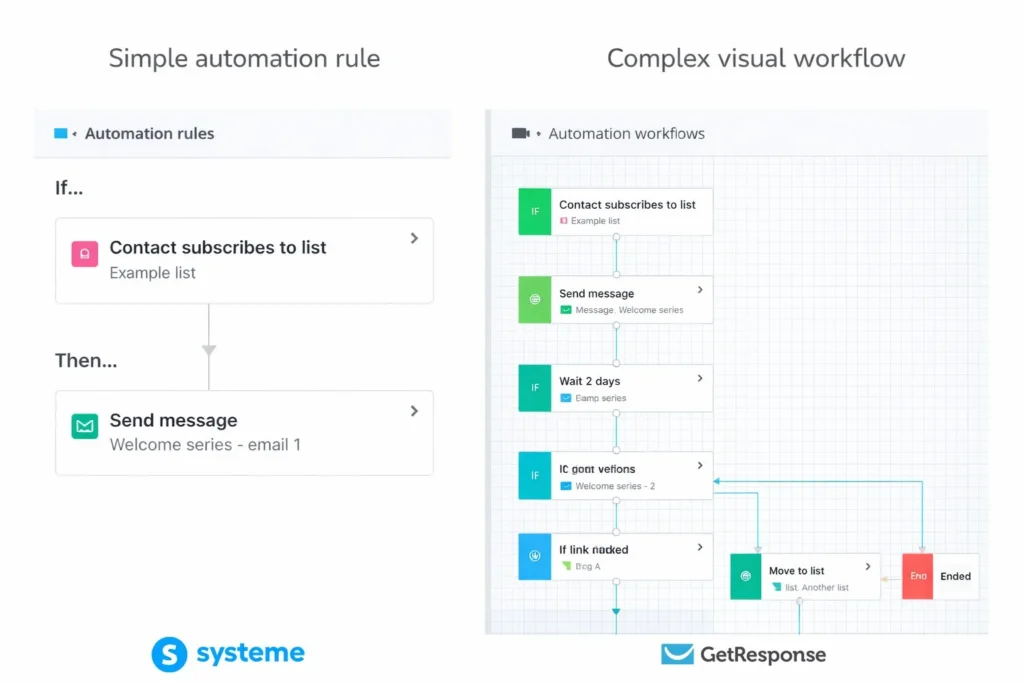
- Advanced Workflows: Systeme.io has simple “Rules,” whereas GetResponse gives you the option to create a complete “Visual Map” based on each user click.
- High Deliverability: Deliverability issues arise when the list becomes large. GetResponse’s server infrastructure is a master at keeping emails out of the spam folder.
Step 1: Exporting Your Gold (Your Contacts)
The first thing to do is pack your “household goods.” That means your contacts.
- Go to your Systeme.io Dashboard and click on the CRM tab. A pop-up list will open. Select Contacts from it.
- Filter the active contacts. I suggest removing the inactive contacts before migration so that your GetResponse remains high quality from day one.
- Select all the contacts, click on More Actions, and press the Export button.
- You will receive a CSV file via email. Clean this file. That is, remove irrelevant columns.
Step 2: Preparing the New Home (GetResponse Setup)
Now that you have the file, you need to prepare to “welcome” it with GetResponse.
- If you haven’t created one yet, click here to start: Start your successful journey with GetResponse here. (Their free trial in 2026 already offers better features.)
- Create a List: Go to GetResponse, click ‘Lists’, and create a new list (e.g., “Systeme_Migration_Leads”).
- Domain Authentication: Connect your custom domain to GetResponse and update the required DKIM/SPF settings. This step is crucial due to the new Google and Yahoo rules in 2026 to ensure your emails go straight to your inbox.
Step 3: The Migrate from Systeme.io to GetResponse Process
Now is the time for real migration.
- In the GetResponse dashboard, click Contacts > Lists > Add Contacts.
- Select the option From file and upload your CSV file.

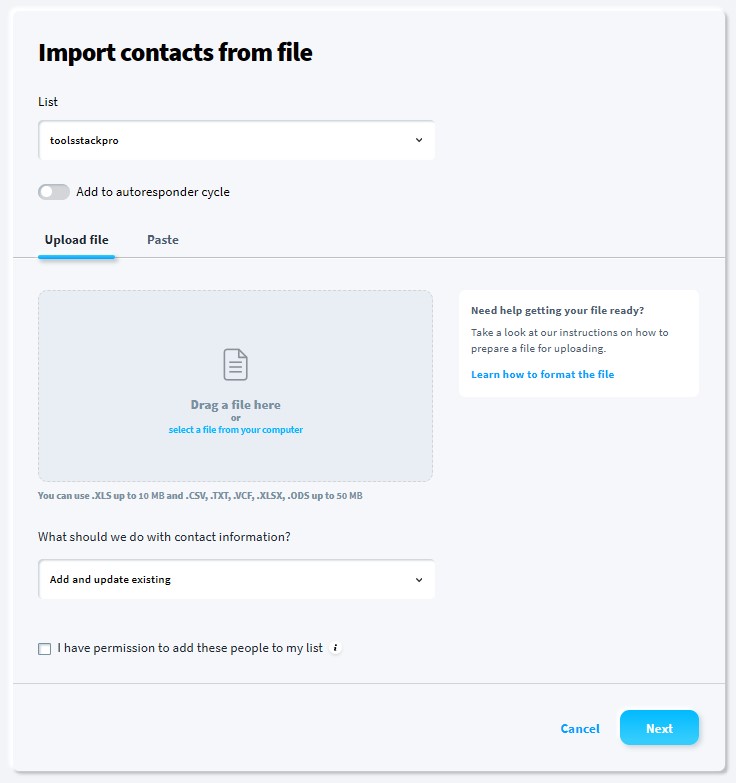
- Mapping: Perform these steps carefully. Ensure the “Email” column in Systeme.io matches the “Email” field in GetResponse. If you added tags (e.g., “Buyer”, “Freebie”), map them to GetResponse’s custom fields.
- Consent Check: GetResponse will ask you if you have these people’s permission. Since these are your opted-in leads, click ‘Yes’ to complete the process.
Step 4: Rebuilding Your Funnels & Automation
There’s a bit more work involved here because landing pages and automation can’t be “exported,” so they have to be recreated.
- AI Landing Page Builder: GetResponse’s builder is so powerful that you can create a similar design in just a few minutes by entering the URL of your system.io page into it.
- Automation Workflows: Rebuild your old autoresponders in the “Automation” section.
- Pro Tip: Use “wait” commands and “condition” filters in GetResponse, which System.io lacks. This can increase your conversions by 20-30%.
Common Mistakes to Avoid During Migration
Here are 3 common mistakes people make during migration that you should avoid:
- Ignoring Tags: If you don’t transfer tags, you won’t know which lead was a “Buyer” and which one just came to see “Free” content.
- Not Testing Links: After creating new GetResponse landing pages, check their links. Don’t forget to redirect old Systeme.io links.
- Moving Everything at Once: If your list is very large, move it little by little so that email providers don’t suspect it’s “Spam.”
GetResponse vs. Systeme.io: 2026 Comparison Table
Here’s a clear comparison that will tell your readers why they should migrate from Systeme.io to GetResponse:
|
Feature |
Systeme.io (Starter) |
GetResponse (Pro Scaling) |
|---|---|---|
|
Best For |
Beginners & Solopreneurs |
Established & Growing Businesses |
|
Email Automation |
Basic (Rules-based) |
Advanced (Visual Workflows) |
|
AI Features |
Basic AI Writing |
AI Email, Layout & Timing Tools |
|
Webinars |
Limited / Basic |
Built-in Advanced Webinars |
|
Deliverability |
Standard |
Premium (Proven High Inbox Rates) |
|
A/B Testing |
Basic Pages |
Advanced Emails & Funnels |
|
Customer Support |
Email Only (Mostly) |
24/7 Live Chat & Priority Support |
The Verdict: Is it Worth the Effort?
Migration does indeed take a day or two of hard work. But to scale your business in 2026, you need powerful tools that simplify your work and lighten your burden, not limit your progress.
GetResponse gives you the scalability a professional digital business needs. Their AI-driven email generator and webinar integration alone are powerful enough to make your subscription fees worth it.
Frequently Asked Questions (FAQs)
Here are some common questions people ask when they migrate from Systeme.io to GetResponse.
Q1: Will I lose my contacts during the migration from Systeme.io to GetResponse?
No, when you Migrate from Systeme.io to GetResponse you won’t lose any data. When you export your contacts from Systeme.io, the platform creates a copy in a CSV file. Your original data remains safe in Systeme.io until you manually delete it or cancel your subscription.
Q2: How long does it take to import a contact list into GetResponse?
The technical upload of a CSV file takes less than 2 minutes. However, GetResponse’s compliance team may perform a quick review of your list to ensure high deliverability and prevent spam. This verification process typically takes anywhere from 30 minutes to 2 hours.
Q3: Can I directly transfer my email templates and funnels?
Unfortunately, no. There is no universal “one-click” transfer for funnels or email designs between these platforms. You will need to recreate your landing pages and copy-paste your email content. The good news is that GetResponse’s AI-powered builder can help you replicate your old designs in a fraction of the time.
Q4: Is GetResponse more expensive than Systeme.io in 2026?
While Systeme.io offers a larger free tier (up to 2,000 contacts), GetResponse provides better value for scaling businesses. If you need advanced features like behavioral automation, built-in webinars, and AI-driven segmentation, GetResponse often becomes more cost-effective as it eliminates the need for multiple third-party tools.
Q5: Will switching to GetResponse affect my email deliverability?
Initially, your deliverability depends on your list hygiene. If you “clean” your list by removing inactive subscribers before the move and properly set up your DKIM and SPF records in GetResponse, you will likely see a significant improvement in your inbox placement rates.
Conclusion & Final Steps
“Final thoughts on why you should migrate from Systeme.io to GetResponse today.
If you’re a regular reader of toolstackpro.com, you know that I’ve always recommended future-proof tools. So, when I say “Migrate from Systeme.io to GetResponse,” I mean it’s a “Business Upgrade.”
Get started now:
- Export your .csv file.
- Create a GetResponse account here: Start your successful journey with GetResponse here
- Automate your business by following this step-by-step guide.





One Comment